
Vessel Volume & Level Calculation
Calculate vessel capacity, filled volume and liquid level using the entered internal vessel geometry. This engineering calculator supports vertical and horizontal cylindrical vessels, rectangular tanks, multiple head geometries, and level-to-volume calibration for practical process, storage, inventory and vessel-design calculations.
What This Calculator Covers
Use the calculator for vessel capacity, liquid-level and calibration calculations across common process-vessel and tank geometries.
01
Volume & Capacity
Calculates total volume, filled volume, remaining or available volume, fill percentage and remaining level margin from the entered internal vessel dimensions and liquid level.
02
Vessel & Tank Geometry
Supports vertical and horizontal cylindrical vessels as well as rectangular tanks with the appropriate geometry and level basis.
03
Vessel Head Geometry
Supports 2:1 ellipsoidal, hemispherical, torispherical / F&D, flat, conical / frustum, and toriconical / knuckled-cone configurations.
04
Liquid-Level Reference
Uses the correct liquid-level reference for vertical, horizontal and rectangular vessel configurations.
05
Level-to-Volume Calibration
Generates 2%, 5% or 10% level-to-volume calibration tables together with a Level vs Volume chart.
06
Engineering Units
Accepts dimensions in mm, m, inch and ft with consistent unit conversion throughout the calculation.
07
Density, SG & Liquid Mass
Optional liquid density or Specific Gravity (SG) input calculates the filled liquid mass in kg and lb.
08
Export & Calculation Records
Provides CSV export, an Engineering PDF report, live vessel visualization and a shareable calculation link.
Vessel Volume & Level Calculator
Inputs
Results
Live engineering output based on the current vessel inputs
Live Vessel Visual
| Level % | Level (unit) | Volume (m³) | Volume (L) | Volume (gal, US) |
|---|
Quick Start (2-minute Guide)
Use the calculator to determine vessel or tank volume from liquid level using the actual internal geometry. Select the vessel configuration, enter the internal dimensions and liquid level, then review the calculated capacity and level-to-volume calibration.
Select Vessel or Tank Geometry
Choose Cylindrical Vessel or Rectangular Tank. Cylindrical vessels support both vertical and horizontal orientations with selectable vessel-head geometry.
Set Orientation & Engineering Units
For cylindrical vessels, select Vertical or Horizontal orientation, then choose mm, m, inch or ft for dimensional inputs.
Enter Internal Dimensions & Head Geometry
Use the actual internal vessel dimensions from the drawing or equipment data.
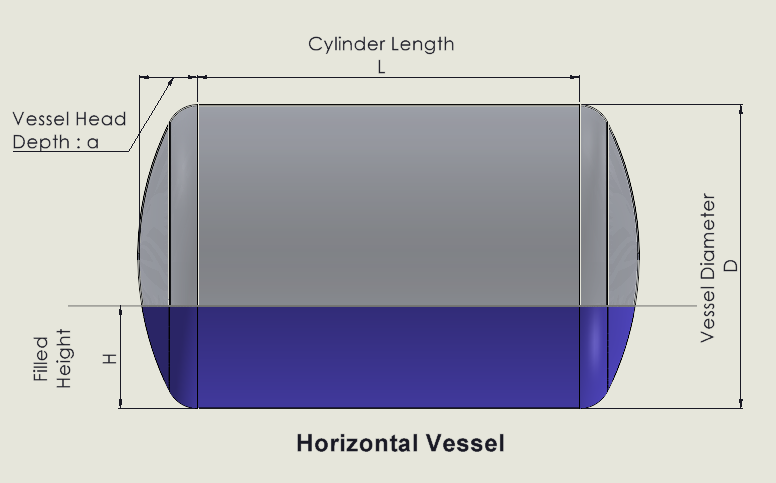
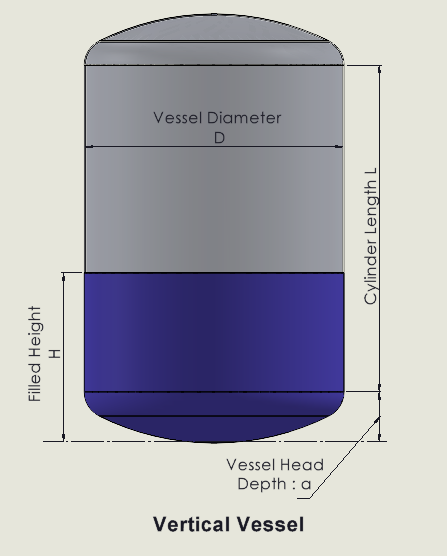
- Cylindrical vessel: internal diameter D and straight shell length/height L
- Rectangular tank: internal length, width and height
- Select the applicable bottom/top or left/right vessel head geometry
Enter Filled Liquid Level
Enter the filled liquid level H using the correct reference point for the selected vessel configuration.
- Vertical vessel: from the lowest internal point of the bottom head
- Horizontal vessel: vertically from the lowest internal point
- Rectangular tank: from the flat internal bottom
Add Liquid Property & Calibration
If liquid mass is required, enter Density or Specific Gravity (SG). Select a 2%, 5% or 10% calibration step to generate the level-to-volume calibration table.
Review, Export or Share Results
Review:
- Total Volume
- Filled Volume
- Remaining / Available Volume
- Fill %
- Level Remaining / Margin
- Filled Liquid Mass
- Live Vessel Visual
- Level vs Volume chart
Then use Download CSV, Download Engineering PDF, or Copy Share Link as required.
Supported Vessel Head Types
Correct head geometry is essential for accurate vessel volume and level calculation because each head profile changes the dish depth, end volume and level-to-volume relationship. Select the actual internal head geometry shown on the fabrication drawing or approved vessel data. The calculator supports different head types at each end of a cylindrical vessel.
| Head Type | Depth / Geometry | Typical Use | Calculation Note |
|---|---|---|---|
| 2:1 Ellipsoidal Head |
a = D / 42:1 ellipsoidal internal profile |
Reactors, process vessels and jacketed vessels | Uses the 2:1 ellipsoidal profile for both full head volume and partial liquid-level calculations. |
| Hemispherical Head |
a = D / 2Hemispherical internal profile |
Pressure vessels and equipment using hemispherical ends | Uses spherical-cap geometry for partial-fill and full head volume. |
|
ASME F&D 6% Torispherical f = 1 · k = 0.06 |
R = Dr = 0.06DDish depth is calculated from crown and knuckle geometry. |
Flanged-and-dished vessel heads | Includes both crown and knuckle geometry rather than approximating the head as a simple spherical cap. |
|
ASME F&D 10% / DIN 28011 f = 1 · k = 0.10 |
R = Dr = 0.10D
|
Vessels using the corresponding 10% knuckle geometry | The larger knuckle radius changes dish depth and contained volume compared with the 6% torispherical configuration. |
|
80:10 Torispherical f = 0.8 · k = 0.10 |
R = 0.8Dr = 0.10D
|
Vessels using an 80:10 torispherical profile | Uses the specified crown and knuckle proportions so the resulting dish depth and end volume are calculated from the actual profile. |
| Conical / Frustum |
Large diameter DSmall-end diameter dCone height h or slope angle θ
|
Cone-bottom tanks, hoppers and conical vessel ends |
Supports a full cone when d = 0 and a frustum when
d > 0. Geometry can be defined by height or cone angle.
|
| Toriconical / Knuckled Cone |
Large diameter DSmall diameter dKnuckle radii R and rAxial height or cone angle |
Knuckled cone bottoms and transition sections | Uses the entered toriconical geometry rather than approximating the transition as a plain cone. |
| Flat Head / Flat End |
a = 0
|
Atmospheric tanks, flat-ended vessels and covers | Adds no dished-head depth or additional head volume. |
For related equipment configurations, explore Reactor Vessels, SS Jacketed Vessels, Chemical Process Reactors and SV Industries Products.
Vertical, Horizontal & Rectangular Tank — Level Reference
Use the references below to enter liquid level H correctly for vertical vessels, horizontal vessels and rectangular tanks. The measurement datum and valid level range differ by geometry, and using the correct internal reference is essential for accurate filled-volume and level-to-volume calculations.
Vertical Vessel
Reference point: the lowest internal point of the bottom-end geometry. For a dished, conical or toriconical bottom, this is the bottom apex.
Htotal = abottom + L + atop
Head depths and straight shell height are based on the actual internal vessel geometry.
- 0 ≤ H ≤ abottom — liquid is within the bottom head or bottom-end region.
- abottom < H ≤ abottom + L — liquid is within the straight cylindrical shell.
- abottom + L < H ≤ Htotal — liquid enters the top-head region.
Sight-glass or level-transmitter zero should reference the same internal datum used for the vessel volume and liquid-level calculation to avoid level-offset errors.
For related equipment, explore Reactor Vessels and SS Jacketed Vessels .
Horizontal Vessel
Reference point: the lowest internal point of the vessel.
Valid H range: 0 ≤ H ≤ D, where D is the internal vessel diameter.
Example: for D = 1000 mm, the valid liquid-level range is 0–1000 mm.
- H = 0 — vessel empty.
- H = D/2 — liquid surface is at the vessel centreline.
- H = D — vessel full.
- Filled volume is evaluated from the cylindrical shell together with the selected left and right vessel-head geometries.
Level-transmitter 0% and 100% should reference the actual internal bottom and top-of-ID datums used for the calculation.
Rectangular Tank
Reference point: the flat internal bottom of the tank.
Valid H range: 0 ≤ H ≤ Ht , where Ht is the total internal tank height.
- H = 0 — tank empty.
- 0 < H < Ht — partially filled tank.
- H = Ht — tank full.
- Filled volume is calculated from the internal Length L × Width W × Filled Level H.
For a rectangular tank with a constant cross-sectional area, the level-to-volume relationship is linear. For example, a liquid level equal to 50% of the internal tank height corresponds to 50% of the geometric tank volume.
Level-to-Volume Calibration
The calculator generates a level-to-volume calibration table from the entered internal vessel or tank geometry. Each calibration point relates a measured liquid level to the corresponding filled volume for operational checks, inventory estimates, level-instrument reference and engineering documentation.
Select a 2%, 5% or 10% calibration interval. The calculator determines the liquid level and corresponding volume at each calibration point and displays the results in m³, litres and US gallons.
Head + Shell Geometry
For a vertical cylindrical vessel, the level-to-volume relationship depends on which section of the vessel is being filled:
- Bottom head
- Straight cylindrical shell
- Top head
Dished, conical and toriconical end geometries therefore affect the calibration near the bottom and top of the vessel.
Nonlinear Level-to-Volume Relationship
For a horizontal cylindrical vessel, liquid volume does not normally increase in direct proportion to liquid level.
The calculator evaluates the circular shell cross-section together with the selected left and right vessel-head geometries to determine filled volume at each calibration level.
Liquid-level percentage should therefore not be treated as volume percentage.
Linear Level-to-Volume Relationship
For the supported flat-bottom rectangular tank, the internal cross-sectional area remains constant throughout the tank height.
The level-to-volume relationship is therefore linear:
Filled Volume = L × W × H
For example, a liquid level equal to 50% of the internal tank height corresponds to 50% of the geometric tank capacity.
Calibration values represent internal geometric volume based on the entered vessel or tank dimensions. Displacement from agitator shafts, coils, internal piping, nozzles or other vessel internals is not automatically deducted.
Liquid Density, Specific Gravity & Filled Liquid Mass
In addition to vessel and tank volume, the calculator can determine filled liquid mass when the liquid density or Specific Gravity (SG) is entered. The mass calculation uses the calculated filled liquid volume, not the total vessel capacity.
Enter Liquid Density
If the liquid density is known, select Density and enter the value in kg/m³.
The calculator multiplies the entered liquid density by the calculated filled volume to determine the filled liquid mass.
Example
1.50 m³ × 1200 kg/m³ = 1800 kg
Enter Specific Gravity (SG)
When density is not entered directly, the calculator can use Specific Gravity (SG) as the liquid-property input basis.
SG is dimensionless. For this calculator, the density conversion basis is:
Density = SG × 1000 kg/m³
Example
SG = 1.20 → Density = 1200 kg/m³
Density or SG input is optional. If only total vessel volume, filled volume, remaining volume, fill percentage or level margin is required, the liquid-property field can be left blank.
For higher-accuracy mass calculations, use the actual liquid density at the relevant operating temperature and concentration. The SG conversion used by this calculator is a practical basis and does not account for temperature-dependent density variation.
Calculation Methods & Formula Basis
The calculator determines total vessel volume and filled liquid volume from the entered internal dimensions and selected geometry. Simple geometries use direct geometric relationships, while compound or partially filled geometries are evaluated section by section.
For cylindrical vessels, the straight shell and each end geometry are treated as separate geometric components. For horizontal vessels, partial liquid volume is determined from the actual liquid depth through the circular shell and selected end profiles.
Straight Cylindrical Volume
The internal straight-shell volume is calculated from internal diameter D and straight length or height L.
V = πD²L / 4
In a vertical vessel, this shell volume is combined with the selected bottom and top head volumes. In a horizontal vessel, only the liquid-filled circular segment of the shell contributes at a partial liquid level.
2:1 Ellipsoidal & Hemispherical Heads
For a standard 2:1 ellipsoidal head:
Head depth a = D / 4Full head volume = πD³ / 24
For a hemispherical head:
Head depth a = D / 2Full head volume = πD³ / 12
Partial-fill calculations use the corresponding ellipsoidal or spherical internal profile rather than applying a simple percentage of full head volume.
F&D Crown + Knuckle Geometry
Torispherical heads are defined using the internal crown radius R and knuckle radius r.
The calculator supports:
- ASME F&D 6% — R = D, r = 0.06D
- ASME F&D 10% / DIN 28011 — R = D, r = 0.10D
- 80:10 Torispherical — R = 0.8D, r = 0.10D
Head depth and volume are determined from the actual spherical-crown and toroidal-knuckle geometry. The crown and knuckle portions are not treated as a single spherical cap.
Conical & Frustum Volume
A conical or frustum end is defined by large diameter D, small-end diameter d and cone height h.
V = πh(D² + Dd + d²) / 12
If the geometry is entered using slope angle θ, measured from the horizontal:
h = (D − d) / 2 × tan(θ)
A full cone is obtained when d = 0;
when d > 0, the geometry is a frustum.
Knuckled Cone / Toriconical Transition
Toriconical geometry uses the large diameter D, small diameter d, large-end knuckle radius R, small-end knuckle radius r, and the specified axial height or cone half-apex angle.
The calculator constructs the corresponding rotational profile and evaluates its contained volume from the entered transition geometry. This avoids replacing a knuckled-cone transition with a simple plain-cone approximation.
Partial-Fill Numerical Integration
For a horizontal cylindrical vessel, the shell contribution is based on the area of the partially filled circular segment at liquid depth H.
The left and right head volumes are evaluated over their internal profiles at the same liquid elevation and added to the cylindrical shell contribution.
This is why horizontal vessel capacity is calculated from geometry rather than assuming that Level % = Volume %.
Constant Cross-Section
For the supported rectangular tank:
Total Volume = L × W × Ht
Filled Volume = L × W × H
Because length and width remain constant with liquid height, the level-to-volume relationship is linear.
Remaining Volume, Fill % & Level Margin
Additional operating values are derived from the calculated geometric volumes:
Remaining Volume = Total Volume − Filled Volume
Fill % = Filled Volume / Total Volume × 100
Level Margin = Maximum Internal Level − Entered Liquid Level
Fill percentage is based on volume, which is especially important for horizontal vessels where liquid level and contained volume are not linearly proportional.
Engineering Assumptions & Limitations
This calculator is intended for geometric vessel and tank volume, liquid-level and calibration calculations . Accuracy depends on the dimensions and geometry entered by the user, so the inputs should represent the actual internal vessel or tank configuration wherever possible.
Use Internal Vessel Dimensions
Enter the actual internal diameter, straight length or height, tank dimensions and internal head geometry .
External fabrication dimensions may include shell thickness or other allowances and can therefore produce a different calculated internal capacity.
Match the Actual Fabricated Profile
Select the vessel-head type and dimensional proportions that correspond to the actual internal fabrication geometry.
Different ellipsoidal, torispherical, conical or toriconical profiles can produce different head depths, contained volumes and level-to-volume relationships.
Internal Displacement Is Not Deducted
Calculated capacity represents the geometric volume inside the selected vessel or tank envelope.
Displacement from vessel internals is not automatically deducted, including:
- Agitator shafts and impellers
- Heating or cooling coils
- Internal pipes and dip tubes
- Baffles
- Large internal nozzles
- Other internal equipment
Nozzle & Minimum-Drain Volume
Standard calculations do not automatically include liquid retained inside nozzles, drain piping, valve cavities or other connected components.
Minimum drainable volume or process heel should therefore be evaluated separately when it is important to the application.
Level Assumes an Un-tilted Vessel
Horizontal-vessel calculations assume the vessel axis is installed horizontally.
Installation slope, vessel tilt or local elevation differences can change the actual liquid distribution and level-instrument reading, particularly at low liquid levels.
Constant Rectangular Cross-Section
Rectangular-tank calculations assume:
- Flat internal bottom
- Constant internal length and width
- Vertical side walls
- Flat or open top
Hopper bottoms, sloped floors, rounded corners and variable cross-sections require separate geometry.
Levels Above Geometric Capacity
If the entered liquid level exceeds the calculated maximum internal level, the calculator displays an overfill warning.
Filled volume, fill percentage, remaining volume, liquid mass and the live vessel visual are limited to the calculated geometric maximum.
Density & SG Are User Inputs
Calculated liquid mass is only as accurate as the entered density or Specific Gravity (SG).
Actual liquid density may vary with temperature, concentration, composition and operating conditions . Use representative process-property data when mass accuracy is important.
Verify critical design or operating values against approved project drawings, equipment data and applicable project requirements before final engineering use.
Validation & Sample Cases
Vertical Vessel with ASME F&D 6% Heads
- Inputs: D = 1000 mm, L = 2000 mm; Bottom head = Top head = ASME F&D 6% Torispherical (R = D, r = 0.06D).
- Expected head depth: a ≈ 169.34 mm each.
- Total level range: Htotal = abottom + L + atop ≈ 2338.68 mm
- Expected total volume: ≈ 1.73279 m³ or approximately 1732.79 L.
- Full-level check: at approximately 2338.68 mm, Filled Volume should equal Total Volume.
Small numerical differences may occur because of displayed rounding or numerical-integration tolerance.
Horizontal Vessel with Flat Ends
Inputs: D = 1000 mm, L = 2000 mm; Left and Right ends = Flat.
Full cylinder volume:
V = πD²L / 4 = π × 1000² × 2000 / 4 ≈ 1.570796 m³
| Level H | Condition | Expected Volume |
|---|---|---|
| 0 mm | Empty | 0 m³ |
| 500 mm (D/2) | Centreline / 50% area | ≈ 0.785398 m³ |
| 1000 mm (D) | Full | ≈ 1.570796 m³ |
Vertical Vessel with Hemispherical Heads
- Inputs: D = 1000 mm, L = 2000 mm; Bottom and Top heads = Hemispherical.
- Head depth: a = D/2 = 500 mm
- Volume of each head: Vhead = πD³ / 12 ≈ 0.261799 m³
- Cylindrical shell volume: ≈ 1.570796 m³
- Total volume: 1.570796 + 2(0.261799) ≈ 2.094395 m³
- Total level range: 500 + 2000 + 500 = 3000 mm
Rectangular Tank
- Internal dimensions: L = 2000 mm, W = 1000 mm, Ht = 1500 mm.
- Entered liquid level: H = 750 mm.
- Total volume: 2.0 × 1.0 × 1.5 = 3.000 m³
- Filled volume: 2.0 × 1.0 × 0.75 = 1.500 m³
- Remaining volume: 1.500 m³.
- Fill percentage: 50%.
- Remaining level margin: 750 mm.
This verifies the linear level-to-volume relationship for the supported flat-bottom rectangular tank geometry.
Filled Liquid Mass Check
Using Benchmark D with Filled Volume = 1.500 m³:
If Density = 1200 kg/m³:
Mass = 1.500 × 1200 = 1800 kg
Expected calculator output: approximately 1800 kg or 3968.32 lb.
The same density basis can be entered as SG = 1.20 when using Specific Gravity mode.
How to Cross-Check the Calculator
- Dimensions: use internal dimensions and confirm the selected units.
- Vertical level datum: measure from the lowest internal point of the bottom geometry.
- Horizontal level datum: use 0 ≤ H ≤ D from the lowest internal point.
- Rectangular level datum: measure from the flat internal bottom.
- Head selection: match the actual fabrication geometry rather than selecting a head type by assumption.
- Full-volume check: at maximum internal level, Filled Volume should equal Total Volume and Fill % should be 100%.
- Empty-volume check: at H = 0, Filled Volume should be zero and Remaining Volume should equal Total Volume.
- Calibration: compare the selected 2%, 5% or 10% calibration points with the Level vs Volume chart and downloaded CSV.
For existing vessels, compare critical dimensions with approved GA drawings or as-built measurements. Related equipment: Reactor Vessel , SS Jacketed Vessel or Contact Us .
Frequently Asked Questions
Find answers to common questions about vessel volume calculation, liquid level, vessel head geometry, calibration, density, Specific Gravity (SG), and calculator limitations.
How do I calculate vessel volume from liquid level?
Enter the actual internal vessel dimensions, select the vessel orientation and applicable head geometries, and enter the measured liquid level (H). The calculator converts the entered level into filled volume and also shows total volume, remaining volume, fill percentage and remaining level margin.
Should I use internal diameter (ID) or external diameter (OD)?
Use internal dimensions for vessel and tank capacity calculations. For cylindrical vessels, enter the internal diameter (ID) and internal straight shell length or height. For rectangular tanks, use the internal length, width and total height. Using external dimensions can overestimate the actual internal capacity.
Which head type should I select if drawings aren’t clear?
Do not assume a head type only because it is commonly used. Confirm the internal head profile from the fabrication drawing, approved GA drawing, manufacturer data or physical measurement. Different ellipsoidal, torispherical, hemispherical, conical and toriconical geometries can produce different head depths, capacities and level-to-volume relationships.
Do jackets or limpet coils change the capacity?
External jackets and external limpet coils normally do not change the vessel’s internal geometric capacity. However, components that extend inside the vessel can displace liquid. Where high accuracy is required, the volume displaced by internal coils, pipes or other internals should be evaluated separately.
Does the agitator (anchor, PBT, hydrofoil) affect level-to-volume?
The basic level-to-volume relationship is determined by the vessel’s internal geometry. However, agitator shafts, impellers and baffles occupy some internal volume. The calculator does not automatically deduct this displacement, so it should be considered separately when the displaced volume is significant for the required accuracy.
The tank is slightly tilted—will calibration be wrong?
A vessel or tank tilt can change the relationship between a local liquid-level reading and the actual contained volume, particularly for horizontal vessels and at low liquid levels. The standard calculator assumes the vessel is installed in the orientation represented by the entered geometry.
Can I mix different head types on top and bottom (or left/right)?
Yes. For cylindrical vessels, the calculator allows different geometries at each end. In a vertical vessel these are the bottom and top heads, while in a horizontal vessel they are the left and right ends. Each selected geometry is included separately in the capacity calculation.
Does the calculator support rectangular tanks?
Yes. Rectangular Tank mode calculates total and filled volume from the internal length, width and height. The current calculation basis assumes a flat internal bottom, vertical side walls and a constant rectangular cross-section.
Why is horizontal vessel level percentage different from volume percentage?
A horizontal cylindrical vessel has a circular cross-section, so liquid volume does not normally increase in direct proportion to liquid level. Except at specific symmetry points, Level % is not the same as Volume %. The calculator determines filled volume from the actual liquid depth and vessel geometry.
What are the 2%, 5% and 10% calibration options?
These options control the interval of the generated level-to-volume calibration table. A 2% interval creates more calibration points, while 5% and 10% produce shorter tables. Each point shows the corresponding liquid level and calculated volume.
Can I calculate liquid mass from density or specific gravity?
Yes. Enter the liquid density in kg/m³ or enter Specific Gravity (SG). The calculator uses the calculated filled liquid volume to estimate the filled liquid mass and displays the result in kg and lb.
What is remaining or available vessel volume?
Remaining or available volume is the unused geometric capacity above the current filled volume.
Remaining Volume = Total Volume − Filled Volume
The calculator also shows the volume-based Fill % and the remaining liquid-level margin.
Can the calculator calculate conical, frustum and toriconical vessel ends?
Yes. The calculator supports conical / frustum and toriconical / knuckled-cone geometries. Use dimensions from the actual fabrication geometry so a knuckled transition is not incorrectly treated as a simple plain cone.
Does the calculator deduct coils, baffles, piping or other vessel internals?
No. The calculated capacity is based on the entered internal geometric envelope. Displacement from internal coils, baffles, agitator components, dip pipes, internal piping and similar hardware is not automatically deducted and should be evaluated separately when required.
Can I download the vessel calibration results?
Yes. The calculator provides a CSV export for level-to-volume calibration data and an Engineering PDF for calculation records. The Copy Share Link option can also preserve the selected calculator inputs for convenient sharing.
Can this calculator be used for pressure vessel design?
This calculator is intended for geometric vessel volume, liquid-level, calibration and filled-liquid calculations. It does not replace pressure-vessel design calculations such as shell or head thickness, MAWP, nozzle reinforcement, support design or applicable code-compliance checks.
Related Vessel & Engineering Resources
Explore related vessel calculators and process equipment resources from SV Industries for preliminary engineering, equipment selection and project planning.
01
Limpet Coil Length Calculator
Calculate limpet coil turns, developed coil length and approximate half-pipe weight for dished ends, cylindrical shells or combined arrangements.
02
Limpet Coil Reactor Vessel
Learn about reactor vessels with external half-pipe limpet coils for heating, cooling and temperature-control applications.
03
SS Jacketed Vessel
Compare conventional jacketed vessel arrangements used for process heating, cooling and temperature-control duties.
04
Reactor Vessel
View custom reactor vessel manufacturing options for chemical, pharmaceutical and other industrial process applications.